Lean Checks Proofs. Nitrax Helps You Type Math Where You Work.
Lean is a serious tool for formalizing mathematics and checking proofs. Nitrax Mathematical Keyboard solves a different problem: typing math symbols quickly in everyday writing apps.
If you heard about Lean or Mathlib because people are using it to write verified mathematics, that is real. Lean is an interactive theorem prover and functional programming language. It can help express definitions, write proofs, and check that those proofs are correct.
But most students and teachers are not always trying to formalize a theorem. Often, they are trying to write an explanation, homework step, worksheet, slide, lab note, or quick equation without breaking flow.
What Lean is actually for
Lean 4 combines a functional programming language with an interactive theorem prover. In a Lean proof, the computer checks whether each step is valid according to the underlying formal system.
Mathlib is the large community-maintained mathematical library around Lean. It gives users access to formalized definitions, theorems, tactics, and mathematical structures that would be painful to rebuild from scratch.
- P
Proof checkingLean is useful when correctness needs to be checked by the system, not only read by a human.
- M
Formalized mathematicsMathlib supports a large body of formal mathematics that Lean users can import and build on.
- C
Code-like writingLean proofs are written in a precise formal language. That precision is the point, but it is also a learning curve.
The typing problem is different
Lean can use mathematical Unicode symbols such as arrows, quantifiers, Greek letters, and relation symbols. In VS Code, many users type text sequences such as backslash commands to insert those symbols.
That helps inside a Lean environment. It does not remove the everyday symbol-entry problem in Word, Google Docs, OneNote, PowerPoint, emails, worksheets, or quick notes.
- W
Writing appsMost everyday math writing happens in normal document tools, not always inside a formal proof project.
- S
Symbol inputStudents and teachers still need a practical way to type common symbols without hunting through menus.
- F
FlowWhen the goal is to explain a step, prepare a worksheet, or take notes, speed and readability often matter more than machine-checked proof.
A fair comparison: Lean vs Nitrax Mathematical Keyboard
The useful question is not whether Lean or Nitrax is “better.” They solve different parts of mathematical work.
| Use case | Lean and Mathlib | Nitrax Mathematical Keyboard |
|---|---|---|
| Formal proof verification | Strong fit. Lean checks proofs in a formal language. | Not a proof assistant or theorem prover. |
| Learning mathematical logic | Useful for students and mathematicians who want to learn formal proof methods. | Useful for typing the symbols that appear in ordinary math explanations. |
| Fast class notes | Possible for Lean users, but the work is still inside a formal language environment. | Designed for quick symbol input in everyday writing apps. |
| Worksheets and teaching material | Good when the goal is formalization or verified examples. | Good when the goal is readable material in Word, Docs, slides, or PDFs created from normal apps. |
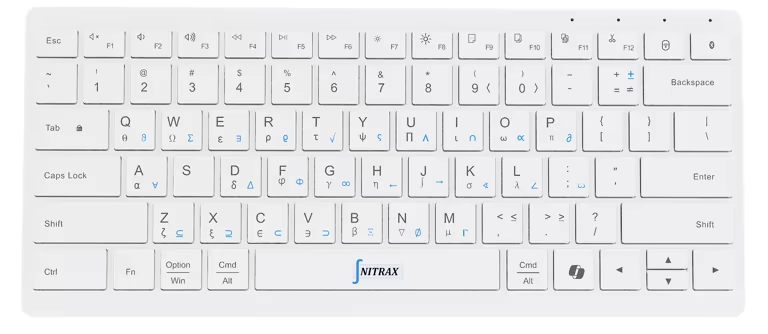
| Typing symbols | Supports Unicode and ASCII alternatives inside Lean workflows. | Printed symbols on physical keys, with blue and gray layers for repeated everyday input. |
| Best role | Formal mathematics, theorem proving, verification, and research workflows. | Fast math symbol entry for students, teachers, and technical writers who need to keep writing. |
Why Lean feels new
Lean has become more visible because formal mathematics is moving from a specialist area into mainstream discussion. Mathlib makes the ecosystem more practical, and modern AI research has drawn more attention to verified mathematics.
That visibility can make Lean sound like a new way to “write equations.” More precisely, Lean is a way to write formal mathematical statements and proofs that a computer can check.
Why a physical keyboard still matters
Even if a student learns Lean, they will still write math in normal places: notes, homework drafts, shared docs, presentations, emails, and explanations for classmates or students.
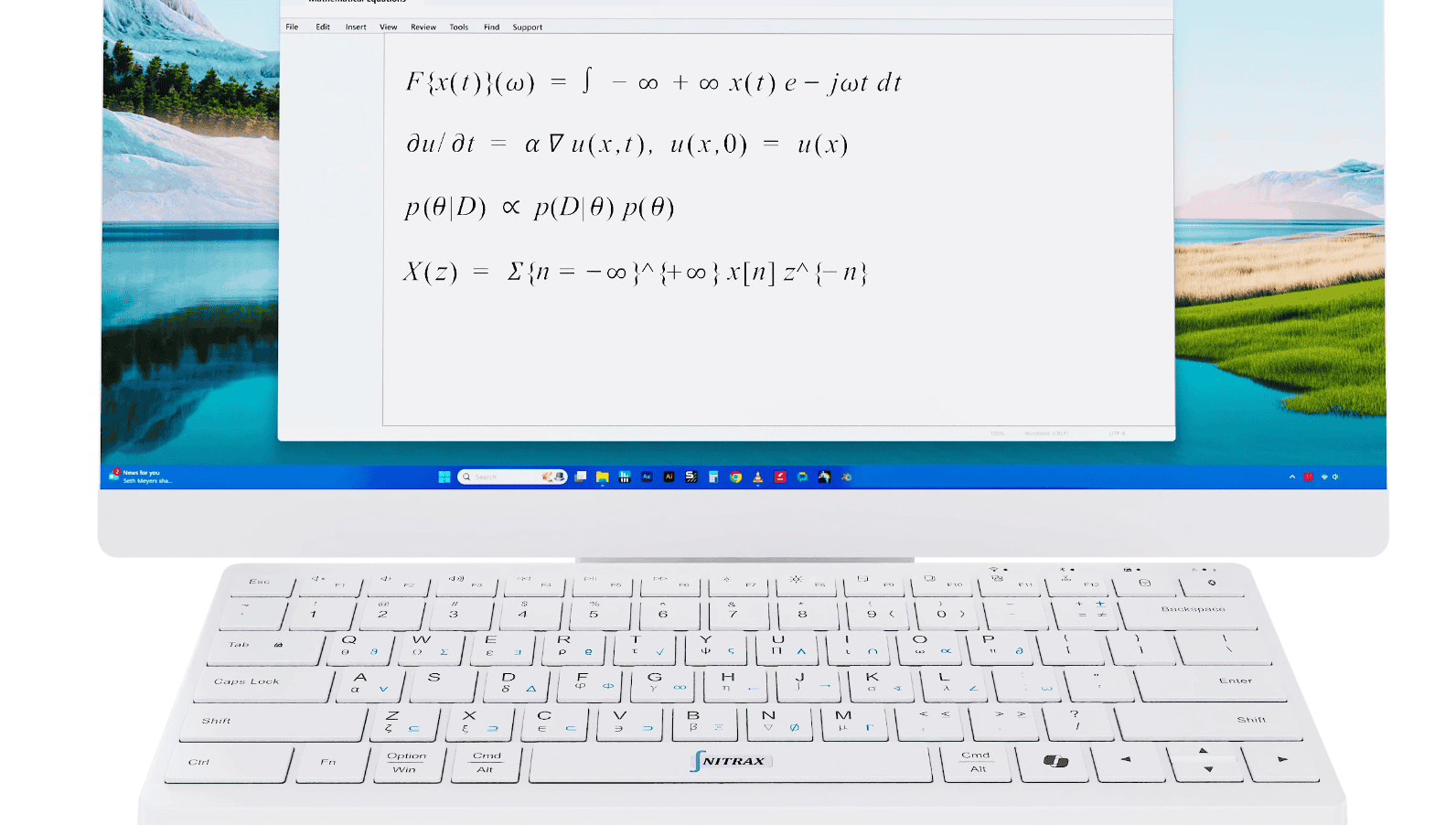
Nitrax Mathematical Keyboard keeps that work physical. The symbols are printed on the keys, and the blue and gray layers give direct access through key combinations. The goal is not formal verification. The goal is to type the symbol and continue writing.
Can you use both?
Yes. A student or researcher could use Lean when they want a proof checked formally, and use Nitrax Mathematical Keyboard when they are writing ordinary mathematical text outside Lean.
That split is practical. Lean is for verification and formalization. Nitrax Mathematical Keyboard is for symbol input in the documents where most daily math writing still happens.
Related pages
FAQ
Is Lean the same thing as Mathlib?
Is Lean a way to type equations faster?
Does Nitrax Mathematical Keyboard replace Lean?
Who should use Lean?
Who should use Nitrax Mathematical Keyboard?
Sources
These official and community sources were used to keep the comparison accurate:
- Lean learning resources, describing Lean as a functional programming language and theorem prover for formalizing math and formal verification.
- Lean 4 learning site, describing Lean 4 as both a general-purpose functional programming language and a theorem prover.
- Lean 4 syntax and Unicode notes, including Unicode symbols and ASCII alternatives.
- Lean Mathlib overview, explaining Mathlib as a library of formalized mathematics for research and verification.
- Lean community site, describing the Lean theorem prover and the community-driven mathlib project.