How to Use Nitrax Mathematical Keyboard with Windows Notepad
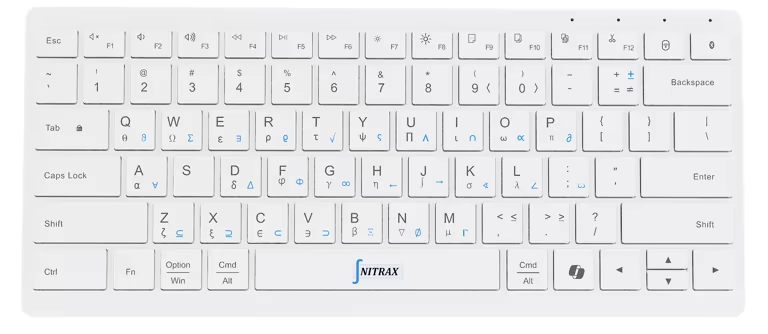
Open Notepad and type √(9) = 3 into a new note. Nitrax Mathematical Keyboard is a compact physical keyboard with mathematical, Greek and scientific symbols printed on its keys. After Windows setup, key combinations enter those symbols alongside ordinary text.
A short Notepad note lets you check whether a symbol enters correctly and whether its shape displays, before writing in another app. Keep the note as a .txt file for formulas, exercise instructions or working explanations.
Start with one square root
- Connect the keyboard and select its Windows mode with Fn + Q.
- Install and open the Nitrax Mathematical Keyboard app from Microsoft Store. Check that Math Mode is on, enabling the printed symbol combinations.
- Open Notepad, click inside your note and press Left Ctrl + Left Alt + T. You should see √ at the cursor.
For connection and installation details, follow the Windows quick-start guide.

Read the color, then type the symbol
Blue and gray are the two sets of symbols printed on the keys. Use the left-side Ctrl and Alt keys; add Shift for gray.
| Printed symbol | Key combination | Text entered |
|---|---|---|
| Blue square root | Left Ctrl + Left Alt + T | √ |
| Gray integral | Left Ctrl + Left Alt + Shift + J | ∫ |
Release the modifiers to continue typing words and numbers. Right Ctrl and Right Alt are not substitutes for these Nitrax controls.
Build a note you can read later
Revision notes
Square root: √(9) = 3
Integral notation: ∫ f(x) dx
Fraction written on one line: (a + b)/c
Type the words, numbers and punctuation normally; use the printed combinations when a symbol is needed. The keyboard enters characters. It does not calculate the answer or turn the integral into a formatted equation.
Save your note as a .txt file using UTF-8, a text encoding that preserves these characters, then reopen it to check the symbols. Microsoft documents Notepad’s UTF-8 saving support.
For stacked fractions, aligned equations or a root bar that stretches across an expression, use an equation editor. Here, √(9) remains a square-root character followed by ordinary text.
For technical text files, see typing math in Notepad++.
Use Notepad to check symbol input
Try the square-root combination before moving to a longer document. Compare the result with the expected √ above.
| What you see | What it tells you | Next step |
|---|---|---|
| Letters work; √ does not | Ordinary typing works, but symbol input needs checking. | Check that the app is running and Math Mode is on. Retry Left Ctrl + Left Alt + T with Notepad focused. |
| An empty box | The character may be present but its shape is unavailable. | Try a font that supports it; display support varies. |
| √ | This combination enters and displays the expected symbol in Notepad. | Continue your note. If another app behaves differently, check its input and font support. |
Keep mathematical symbols in your everyday notes
If Notepad is where you collect formulas and explanations, Nitrax Mathematical Keyboard puts the symbols on physical keys you can read as you write. Set up the Windows app, then type them directly into your notes.
Buy nowPublished by the maker of Nitrax Mathematical Keyboard.