How to Use Nitrax Mathematical Keyboard with Notepad++
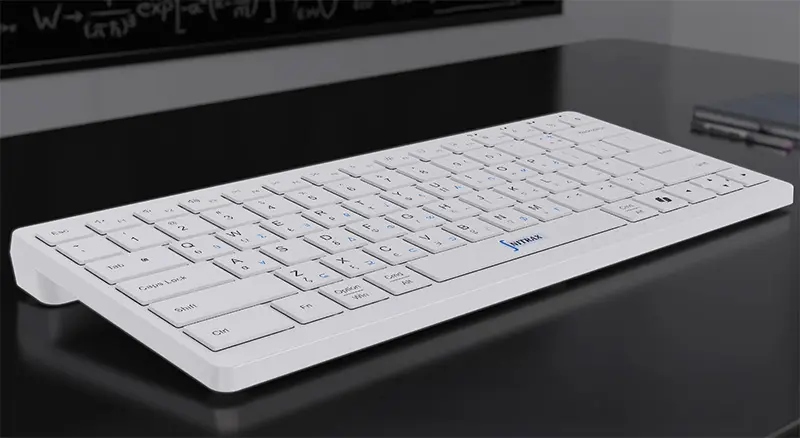
Writing a technical note in Notepad++ and need a √ in the middle of a sentence? Nitrax Mathematical Keyboard is a compact physical keyboard with letters and mathematical, Greek and scientific symbols printed on its keys.
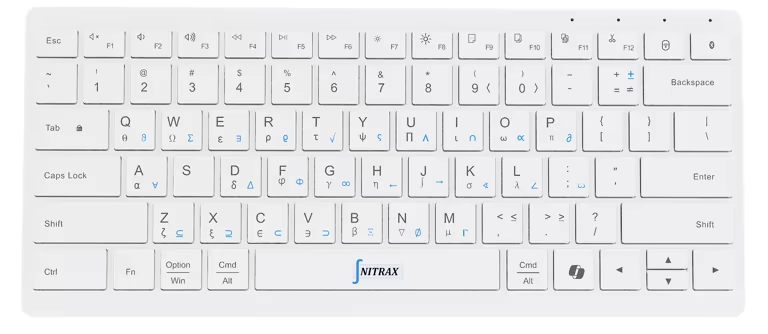
After Windows setup, key combinations enter the symbols from the blue and gray printed layers directly into your text. Keep writing your explanation instead of looking elsewhere for a symbol to copy.
Put your first symbol in a text file
Connect the keyboard, install the Nitrax Mathematical Keyboard app from Microsoft Store and keep Math Mode on to enable the printed symbols. Follow the Windows setup guide if this is your first use.
Open a new, empty Notepad++ document. Choose Encoding > UTF-8, click in the editing area and try these combinations:
| Press on the physical keyboard | Text inserted |
|---|---|
| Left Ctrl + Left Alt + T | √ |
| Left Ctrl + Left Alt + Shift + J | ∫ |
Use the left Ctrl and Alt keys. The blue symbols use both modifiers; the gray symbols add Shift.
For a simple input check, try math symbols in Windows Notepad.
Keep the symbols when you save and share
UTF-8 stores Unicode characters, including math symbols and Greek letters. Make a small test file before adding them to an important document.
- Type: add
Root: √9 = 3to your new UTF-8 document. - Save: use a name such as
math-notes.txt. - Reopen: close the tab, reopen the file and check that √ remains readable.
For an existing file that already displays correctly, Encoding > Convert to UTF-8 changes its storage encoding while retaining the characters. Simply selecting UTF-8 changes how existing bytes are interpreted; it is a different action. Keep a copy before converting.
When sharing the file, check that the receiving editor or tool reads UTF-8 and displays your symbols.
Write notation for the person reading it
Illustrative technical note
Root: √9 = 3
Integral: ∫ f(x) dx
Notation: indefinite integral
Illustrative code comment
// Use √x when describing the square root.
These are human-readable text examples. Comment syntax depends on your programming language, and mathematical symbols do not automatically become executable operators.
Notepad++ stores the notation as text. It does not arrange stacked fractions or typeset the integral; use an equation editor or LaTeX workflow when you need that layout.
Keep math symbols beside the words you type
If Notepad++ is where you draft technical notes, comments or explanations, Nitrax Mathematical Keyboard gives you printed symbols to reach for on the same physical keyboard. Choose it for repeated symbol entry in your everyday writing.
Buy nowPublished by the maker of Nitrax Mathematical Keyboard.