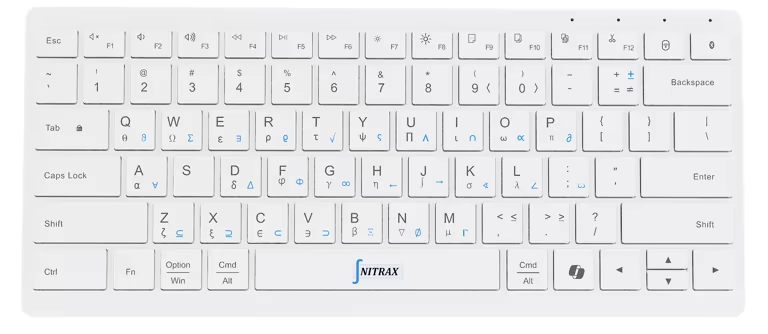
Keyboard with math symbols

Keyboard With Math Symbols Printed on the Keys

If you are looking for a keyboard with math symbols, the important detail is whether the symbols are visible on the physical keys. Nitrax Mathematical Keyboard is a compact physical keyboard made for typing mathematical symbols, Greek letters, and scientific notation directly in everyday writing apps.

This page is for people searching for a keyboard with mathematical symbols, a math symbols keyboard, or a keyboard for math symbols. The practical answer is a real hardware keyboard with printed symbol layers, not another menu, virtual keyboard, or copy/paste workflow.

Front view of the Nitrax Mathematical Keyboard with math symbols printed on the keys
Nitrax Mathematical Keyboard is a physical hardware keyboard. The symbols are printed on the keys, so you can find math symbols without opening symbol menus or searching online.

Short answer

A keyboard with math symbols is useful when the symbols are printed directly on the keys and available through simple key combinations. That is the core difference between Nitrax Mathematical Keyboard and software-only symbol tools.

For students, teachers, and anyone writing math in Word, Google Docs, PowerPoint, emails, notes, or reports, a physical keyboard with printed math symbols can reduce symbol hunting and keep the writing flow moving.

Printed symbols

The math symbols are visible on the keyboard, so you do not need to remember a separate code for every symbol.

Everyday apps

Use it for normal writing workflows like Word, Google Docs, slides, emails, notes, and study documents.

Physical input

This is a real keyboard for math writing, not a virtual keyboard, calculator, or equation editor.

Why a normal keyboard feels incomplete for math

Standard keyboards are built for letters, numbers, punctuation, and common commands. They are not built around Greek letters, roots, integrals, arrows, inequalities, or scientific symbols.

That is why people end up using copy/paste, insert-symbol menus, Alt codes, equation toolbars, or LaTeX syntax even when they only need a common symbol in a normal document.

What a keyboard with math symbols fixes

  • 1

    Less searchingThe symbol is printed on the key, so you do not need to hunt through menus every time.

  • 2

    Faster repeated writingRepeated symbols become easier when the layout is visible and consistent.

  • 3

    Better writing flowYou can stay in your document instead of switching between tools.

Keyboard with math symbols vs other ways to type math

Method Good for Main friction Best use
Nitrax Mathematical Keyboard Fast symbol entry in normal writing apps Small habit to build around printed symbol layers Frequent math writing in everyday apps
Insert-symbol menus Occasional symbols Slow when repeated often One-off symbols
Copy/paste Rare symbols found online Breaks concentration and can introduce formatting issues Emergency fallback
Equation editors Structured formula layout Menus and editor mode can slow ordinary writing Fractions, matrices, display equations
LaTeX or Typst Final technical documents Requires syntax and rendering workflow Formal papers and polished output

Made for students and teachers

The strongest use case is practical writing: homework, notes, worksheets, slides, examples, explanations, and study material. These are not always formal documents. They are daily writing tasks where repeated symbol entry becomes annoying.

A physical keyboard for math symbols is especially useful when you need Greek letters, operators, roots, relations, and scientific notation often enough that menus start to feel slow.

StudentsTeachersWordGoogle DocsSlides

Not a virtual math keyboard

A virtual math keyboard can be useful on a phone, tablet, or specific web app. But it still keeps symbols behind a software interface.

Nitrax Mathematical Keyboard keeps symbols on the physical keys. That matters when you are writing on a computer and want the input method to feel direct.

Search terms this page answers

People describe the same need in different ways. This page targets the practical search intent behind:

keyboard with math symbols
keyboard with mathematical symbols
math symbols keyboard
keyboard for math symbols
physical keyboard for typing math symbols

Bottom line

If you only type one symbol now and then, a menu or copy/paste may be enough. If math appears often in your notes, assignments, worksheets, slides, or technical writing, a keyboard with math symbols printed on the keys is a more direct workflow.

Nitrax Mathematical Keyboard is built around that exact idea: a compact physical keyboard for typing math symbols directly in everyday apps.

FAQ

Is there a keyboard with math symbols printed on it?
Yes. Nitrax Mathematical Keyboard is a physical keyboard with math symbols printed directly on the keys. It is designed for typing mathematical symbols, Greek letters, and scientific notation in everyday writing apps.
Is this a physical keyboard or a virtual keyboard?
It is a physical hardware keyboard. It is not an on-screen keyboard, browser extension, calculator, or software-only layout.
What is the difference between a math symbols keyboard and an equation editor?
A math symbols keyboard helps you type symbols directly. An equation editor helps format structured equations. Many users can use both: the physical keyboard for fast input, and the equation editor for complex layouts.
Who is a keyboard for math symbols useful for?
It is useful for STEM students, teachers, educators, and anyone who writes equations, Greek letters, and scientific symbols often in normal documents, slides, notes, or emails.