What Is a Mathematical Keyboard?
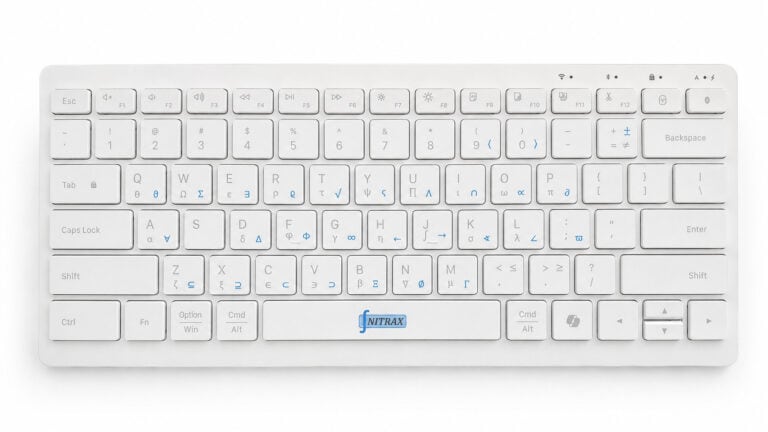
A mathematical keyboard is a physical keyboard with math symbols printed on the keys. It helps you type Greek letters, operators, and scientific notation directly in normal writing apps.
Most people who write math keep running into the same friction: symbol menus, copy/paste, Alt codes, or syntax-heavy tools. That is fine for occasional use and annoying when math shows up all day.
A mathematical keyboard for everyday apps changes the input layer itself. The symbols are visible on the keys, so you can type math where you already work instead of moving the work into another tool.
Why normal keyboards create friction
A standard keyboard hides the math layer. You have to look for symbols, remember codes, or switch into another editor.
That adds small interruptions that pile up quickly when you are taking notes, doing homework, or writing technical documents.
- H
Hidden symbolsThe layout does not show the math layer.
- L
Lookup timeEvery symbol can become a search problem.
- F
Flow lossWriting math turns into switching tools.
What a mathematical keyboard fixes
Nitrax Mathematical Keyboard puts the symbols on the keys and keeps the writing flow in your document, notes, slides, or email.
After a little use, the layout becomes muscle memory. That is the real advantage: less thinking about input and more thinking about the math.
A fair comparison
| Use case | What Is a Mathematical Keyboard? | Nitrax Mathematical Keyboard |
|---|---|---|
| Visible math layer | No. | Yes. |
| Needs code lookup | Often yes. | No. |
| Works in everyday apps | Only with extra steps. | Yes. |
| Best role | Generic typing. | Direct math symbol input. |
FAQ
Is a mathematical keyboard software?
Is this useful outside school?
FAQ
What is a mathematical keyboard?
Is it a virtual keyboard?
Who is it for?