Best Keyboard for STEM Students: Choose for What You Write
You are halfway through a lab report when you need ±. Another sentence needs θ. The best keyboard for STEM students should make that everyday writing easier.
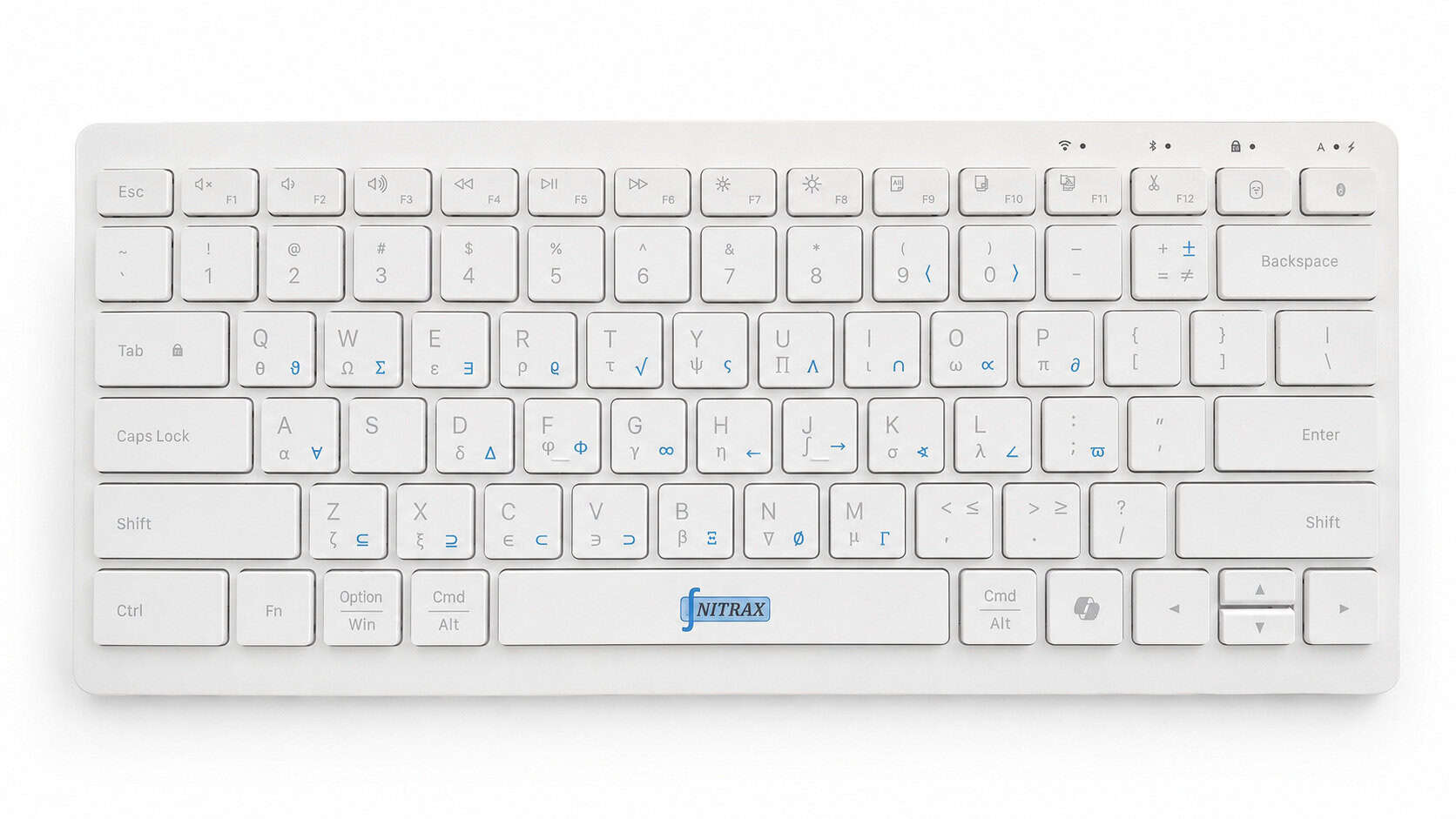
Our pick for notes and reports that mix words with math symbols is Nitrax Mathematical Keyboard: a compact physical computer keyboard with letters and mathematical, Greek and scientific symbols printed on its keys. You can write the explanation and its symbols on the same keyboard.
Look at the sentences you write each week
A STEM document often needs a symbol inside an ordinary sentence. These examples show where a physical math keyboard earns its place.
- Physics notes
- The angle θ is measured from the normal.
- Lab report
- The measured length is 12.4 ± 0.2 cm.
- Math explanation
- Include values where x ≤ 5.
After setup, key combinations enter symbols from the blue and gray markings printed on Nitrax Math Keyboard. The symbol appears in your document, so you can continue the sentence.
Match the keyboard to your main task
| Your main task | A useful choice | Why it fits |
|---|---|---|
| Words and math symbols together | Nitrax Math Keyboard | Printed symbols and key combinations keep symbol entry on the keyboard. |
| Typing across several devices | Logitech Pebble Keys 2 K380s | Compact design; Easy-Switch selects among up to three paired devices. |
| Rows of numerical measurements | A full-size keyboard with a number pad | A dedicated area for repeated digit entry. |
| Mostly writing code | Your existing keyboard, if comfortable | Keep the syntax your language requires, such as <= or !=. |
Logitech documents the K380s design and device switching. For a symbol in Word with a conventional keyboard, open Insert → Symbol → More Symbols and select it. Microsoft also suggests AutoCorrect for repeated symbols.
Check your study setup before buying
Take one page of your own notes. Mark each place you searched for a symbol. If those interruptions recur, Nitrax Math Keyboard addresses a real part of your writing routine.
Check the current setup requirements for your computer and the text input supported by your apps. On a university-managed computer, confirm that you can install the required companion software. App and font support vary.
For structured equations, Google documents Insert → Symbols → Equation, where typing \alpha followed by a space inserts alpha. Nitrax Math Keyboard enters symbols; equation layout and final LaTeX typesetting remain separate tasks.
For individual access needs, explore math-writing options to evaluate.
Taking notes in OneNote? See the OneNote math-typing guide.
Keep the symbols with the explanation
Choose Nitrax Mathematical Keyboard for lecture notes, lab reports and explanations that regularly mix words with math symbols. See how the key combinations work.
Buy nowPublished by the maker of Nitrax Mathematical Keyboard.