Math-writing solutions for dyscalculia, dysgraphia and accessibility needs
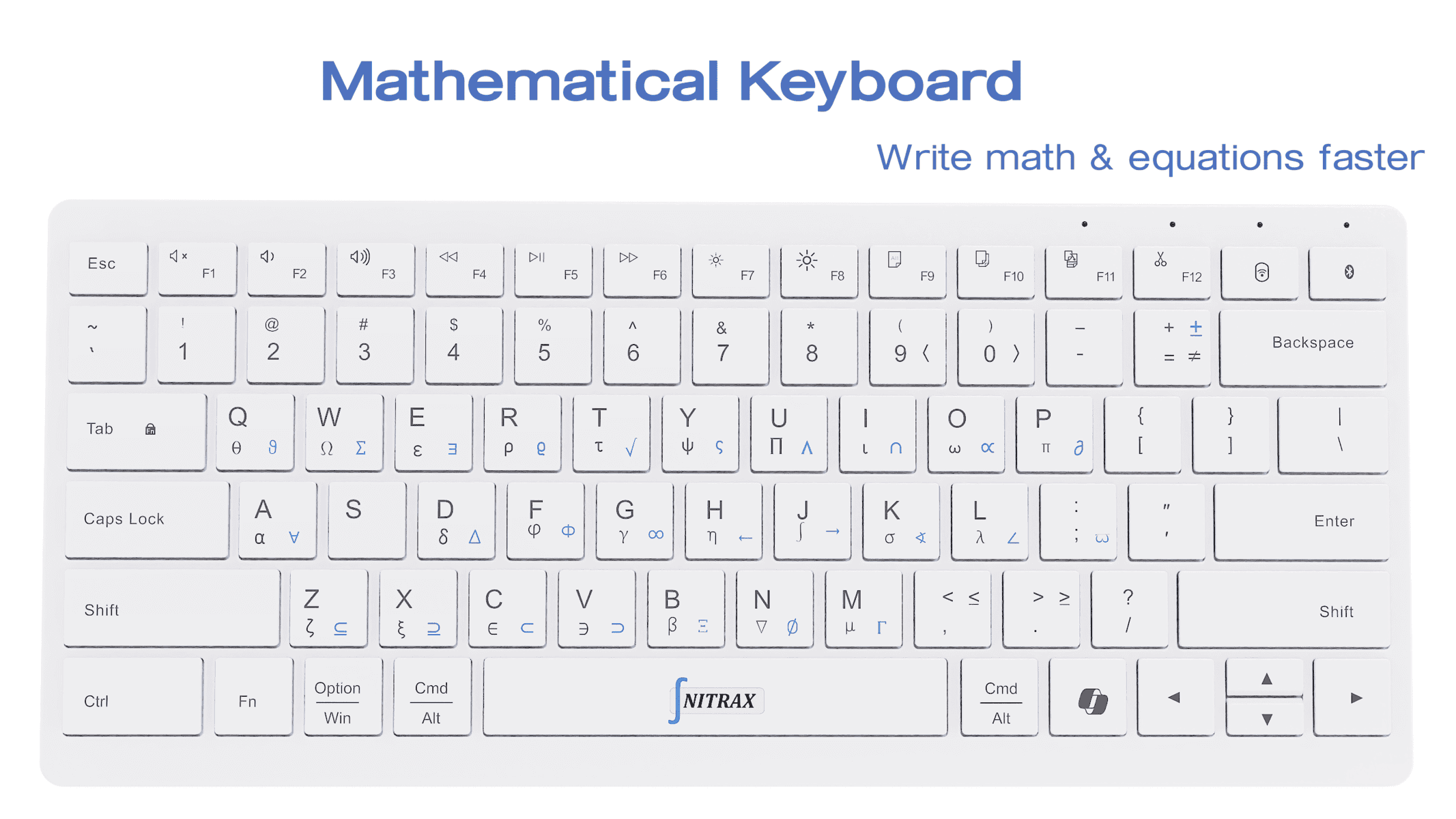
Finding it difficult to type math symbols? Nitrax Mathematical Keyboard offers a physical alternative with letters and mathematical symbols printed on its keys. Do you use LaTeX or Typst? Remembering commands or looking up symbols may interrupt your writing.
After setup, see the symbol on the key, use its key combination and type it into your document in a supported app. Blue and gray printed layers show the available symbols. For dyscalculia, dysgraphia or other accessibility needs, consider this option if you can comfortably use its physical layout and key combinations.
Benefits of Nitrax Mathematical Keyboard for the conditions and accessibility needs discussed below are not scientifically established. We claim no endorsement or recommendation from any doctor or official organization.
UDL starts with a choice of ways to write
Looking for a UDL accessible technology solution for math writing? Universal Design for Learning (UDL) is a framework for designing learning with different ways to engage, access information and express ideas. CAST’s UDL Guidelines describe these principles. UDL is a design framework, not a product certification.
For math writing, offer input choices and support learning to use them. CAST’s guidance on accessible tools also stresses compatibility with assistive technology. Choose around the person’s task and preferences.
Match the option to the writing task
You may be exploring writing options in these contexts:
- Dyscalculia and dysgraphia
- Autism, cerebral palsy and neurological disorders
- Dyspraxia, coordination difficulties and fine motor skills deficits
- Intellectual disability, including for some people with Down’s syndrome
- Memory issues and visual impairment
These terms do not determine an individual’s writing needs. Evaluate the tasks below with the person who will use the tools.
| Task | Option to explore | Check |
|---|---|---|
| Find and enter ≥ | Nitrax Mathematical Keyboard’s printed symbols; app symbol menus | Can you locate the symbol and enter it comfortably? |
| Write a sentence without handwriting | Typing; voice input | Can you enter the words, verify symbols and correct errors? |
| Use an alternative to simultaneous key presses | Sticky Keys; on-screen input with switch access | Does the chosen method enter the required symbols? |
| Read the finished mathematics | Magnification; an equation editor with accessible output | Can you read or hear the saved expression accurately? |
Microsoft documents Sticky Keys for sequential commands, Filter Keys for brief or repeated presses, and on-screen input with switch scanning. These are general Windows options; their compatibility with Nitrax symbol combinations is unverified.
Try one line, then a correction
Illustrative writing task: Enter ‘The limit is x ≥ 3.’ Then change ≥ to ≤.
Use your usual app and assistive tools. Check key reach, accidental presses, correction steps and fatigue. Can you distinguish the printed symbols and operate the combinations? Printed legends are visual cues; check whether you can use them. Save the document and read it back.
For structured equations, DAISY’s accessible publishing guidance recommends MathML, markup that represents mathematical structure, while noting support limitations. Entering visible symbols alone does not guarantee accessible output. Check the saved format with the actual reading tools.
Nitrax Mathematical Keyboard enters symbols; it does not calculate or arrange complete equations. App support varies, and it does not replace LaTeX. Evaluate writing access separately from understanding the mathematics.
Want printed math symbols on your keyboard?
Consider Nitrax Mathematical Keyboard for everyday words and math symbols if its key combinations suit your writing needs. Check the physical layout and setup requirements before buying.
Buy nowPublished by the maker of Nitrax Mathematical Keyboard.