Program Your Keyboard for Math Writing?
You can program a keyboard for math writing, including math symbols, Greek letters, and scientific characters. But if your goal is simply to write math faster, programming a keyboard may be a workaround, not the simplest solution.
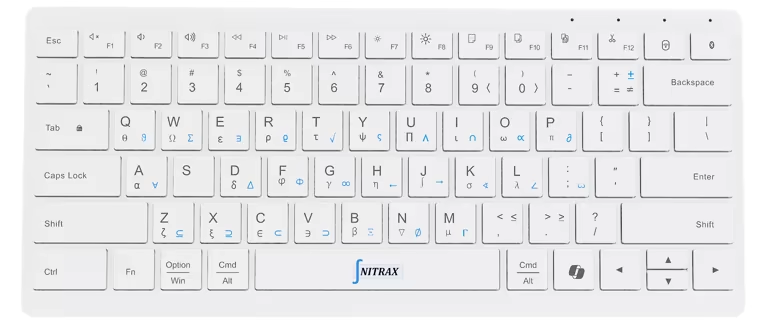
Nitrax Mathematical Keyboard is a physical math keyboard with the symbols already printed on the keys. Instead of building your own math layer, memorizing custom mappings, or maintaining a programmable keyboard setup, you can use a keyboard designed for mathematical writing from the start.
Short answer
Yes, a programmable keyboard can be configured for math writing. You can assign symbols, Greek letters, or text snippets to custom layers, macros, or key combinations depending on the keyboard and software you use.
But that means you have to decide the layout, remember the mappings, maintain the configuration, and often solve compatibility issues yourself. A physical math keyboard like Nitrax Mathematical Keyboard removes that setup work by putting the math symbols directly on the keys for everyday math writing.
Programmable keyboards
Flexible, powerful, and useful for people who enjoy building their own keyboard layers.
The problem
Math symbols become your own custom system, which can add setup time and memorization.
The alternative
A physical keyboard with printed math symbols gives you a ready-made math layer.
Why people program keyboards for math
Normal keyboards are not designed around mathematical writing. They are missing common symbols like roots, integrals, inequalities, arrows, Greek letters, and scientific notation.
So power users often try to create their own solution. They may use programmable keyboards, custom layouts, text expansion tools, macros, compose keys, or app-specific keymaps.
- 1
They want direct symbol inputTyping α, β, √, ∫, ≤, ≥, or → should not require a menu every time.
- 2
They want fewer interruptionsCopy/paste and insert-symbol menus interrupt the writing flow.
- 3
They already use layersProgrammable keyboard users are comfortable with layers and custom key behavior.
Where the custom setup becomes friction
Programming a keyboard works best when you already know exactly what you want. For math input, that can become surprisingly detailed.
You need to choose which symbols matter, where they live, how to trigger them, which apps accept them correctly, and how to remember everything later.
- M
Mapping workYou have to build your own symbol layout from scratch.
- R
Recall costIf the symbols are not printed on the keys, you still need to remember where they are.
- U
Update costKeyboard firmware, app settings, OS behavior, and layouts can change over time.
Programmable keyboard vs Nitrax Mathematical Keyboard
| Question | Programmable keyboard | Nitrax Mathematical Keyboard |
|---|---|---|
| Do you need to design the math layout? | Usually yes. You decide the symbol layer and mappings. | No. The math symbols are already printed on the keys. |
| Are symbols visible? | Only if you add custom keycaps, labels, overlays, or remember the layout. | Yes. The symbols are printed directly on the keyboard. |
| Is it flexible? | Very flexible if you enjoy customization. | Focused on math, Greek letters, and scientific symbols. |
| Who is it best for? | Keyboard hobbyists and advanced users who want to build their own system. | Students, teachers, and STEM users who want to type math without building a custom setup. |
| Main cost | Time, setup decisions, maintenance, and memory. | A small habit around printed symbol layers. |
You can program it. But do you need to?
If your keyboard hobby is the point, programming your own math layer can be satisfying. You get control over every symbol, every key, and every behavior.
If your real goal is to write math faster in Word, Google Docs, PowerPoint, notes, emails, and everyday documents, the custom setup may be extra work. In that case, a keyboard with math symbols printed on the keys is more direct.
Printed symbols reduce the memory problem
The biggest weakness of many custom keyboard math layouts is visibility. If the symbols are hidden in your personal layer, you still need to remember where every symbol lives.
Nitrax Mathematical Keyboard makes the layer visible. Greek letters, math operators, and scientific symbols are printed on the keyboard, so the layout does not feel like a private code you have to reconstruct every time.
When a programmable keyboard still makes sense
A programmable keyboard can still be a good choice if you already use one heavily and want complete control. It can also make sense for very specific workflows, unusual symbols, personal macros, or software commands that go beyond ordinary math writing.
The point is not that programmable keyboards are bad. The point is that mathematical writing has a simpler input problem: the symbols are missing from normal keys. Nitrax Mathematical Keyboard solves that problem with a dedicated physical keyboard instead of asking you to design the solution yourself.
For students and teachers, setup time matters
Most students and teachers do not want a keyboard project. They want to finish notes, assignments, worksheets, slides, and explanations faster.
That is where a dedicated physical math keyboard is stronger. The product already communicates the layout visually, and the symbol layers are built around math writing rather than general keyboard customization.
For engineers and technical users
Engineers and technical users may appreciate programmable keyboards, but they also write in many different apps: reports, emails, specs, notes, spreadsheets, and slides.
A physical mathematical keyboard gives you common symbols directly in those environments, without needing to move your whole workflow into a custom keyboard configuration.
Bottom line
Programming a keyboard for math writing can work. But for many people, it solves one friction by creating another: a personal system to design, remember, and maintain.
Nitrax Mathematical Keyboard is the more direct path: a compact physical keyboard for typing math symbols, Greek letters, and scientific notation with the symbols printed directly on the keys.
Related pages
FAQ
Can I program a keyboard to type math symbols?
Why use a physical math keyboard instead?
Is Nitrax Mathematical Keyboard a programmable keyboard?
Who should still use a programmable keyboard?