Does a Math Keyboard Exist?
Yes. A real physical math keyboard exists.
Nitrax Mathematical Keyboard is a compact physical keyboard for typing math symbols, Greek letters, and scientific notation directly in Word, Google Docs, emails, and notes.
Instead of opening symbol menus or copying characters from somewhere else, you can type them directly from the keyboard through the printed symbol layers.
If you are searching for a math keyboard, a mathematical keyboard, or even a math keyboard for PC, Nitrax belongs exactly in that category of product.
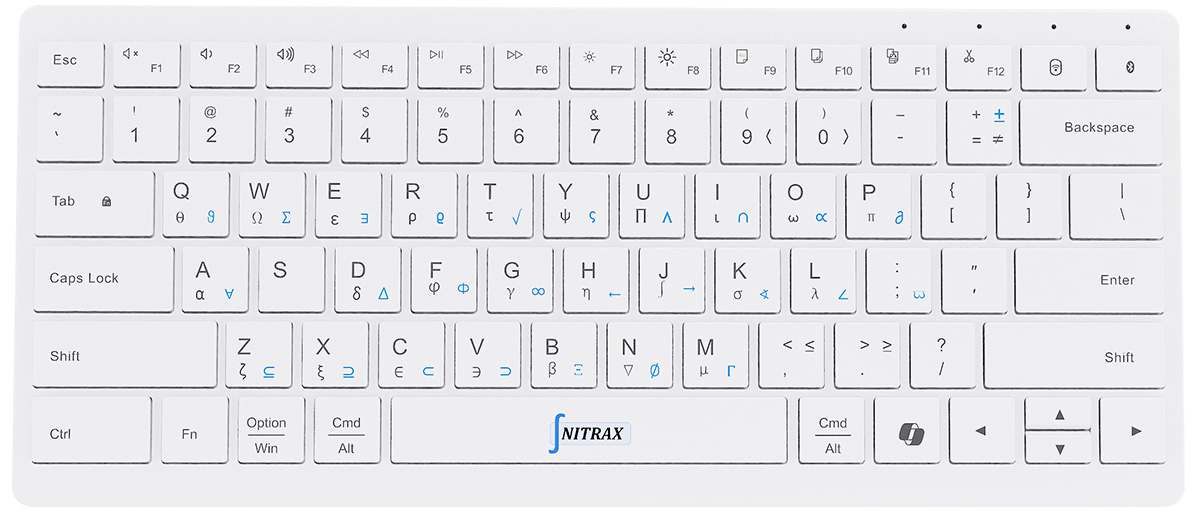
What it is
Nitrax is a normal keyboard first. You can use it for standard typing just like any other keyboard. The difference is that it also includes a dedicated math layer, so common mathematical symbols are much easier to access.
This makes it useful for notes, worksheets, reports, explanations, emails, and any other situation where you need to insert math symbols quickly without breaking your flow.
In other words, it is not just a concept. It is a real math keyboard for PC users and anyone who wants physical keys instead of software-only solutions.
What it lets you type faster
-
α
Greek letters
Alpha, beta, sigma, delta, pi, and more. -
∫
Math operators
Integrals, roots, infinity, summations, sets, and other common symbols. -
√
Everyday math writing
Useful for quick technical writing in normal apps, not just for formal papers.
Why it matters
| Without Nitrax | With Nitrax |
|---|---|
| Search for symbols manually | Type them directly from the keyboard |
| Copy and paste characters from other sources | Stay in the same document and keep typing |
| Open insertion menus repeatedly | Use the printed symbol layers on the keys |
| Lose time on simple symbols | Write faster with less friction |
Who it is for
-
1
Students
For cleaner notes, homework, and study documents. -
2
Teachers
For worksheets, explanations, and classroom material. -
3
Engineers and scientists
For everyday technical writing that includes symbols and Greek letters.
Where it works
Nitrax is designed for normal writing environments where people actually work every day.
-
W
Microsoft Word
For reports, equations, worksheets, and teaching material. -
G
Google Docs
For notes, shared documents, and everyday writing. -
@
Emails and other editors
Useful anywhere you need to type mathematical symbols quickly.
So, does a physical math keyboard exist?
Yes. If you are looking for a real keyboard that keeps normal typing intact while also making mathematical symbols easier to type, that is exactly what Nitrax is.
It brings mathematical writing closer to the speed and ease of standard typing.
Whether you searched for a math keyboard, a mathematical keyboard, or a maths keyboard, the answer is the same: yes, this category exists, and Nitrax is one of the few real physical options.