Best Keyboard for Engineers Who Write Math
Engineers rarely need more complexity. They usually need less friction.
In real engineering work, math does not live only inside formal papers. It also appears in notes, technical documents, specifications, explanations, emails, reports, presentations, and quick calculations.
That is why the best keyboard for engineers who write math is not always the most advanced publishing workflow. Very often, it is the one that makes common symbols faster to type in the tools engineers already use every day.
For many engineers, that means using a math keyboard for PC that works naturally in Word, documents, spreadsheets, emails, and other everyday writing apps.
What engineers actually write
Engineering writing often mixes plain language with symbols, variables, units, formulas, and Greek letters. You may need to write something like σ, ΔT, λ, μ, √, ∫, or ≤ in the middle of a sentence, a table, or a short technical explanation.
That is very different from writing a full research paper from scratch in LaTeX. It is a faster, more fragmented, more practical kind of writing.
Why standard keyboards feel slow
-
1
Too much menu hunting
Finding symbols in insertion menus breaks concentration. -
2
Too much copying and pasting
Common symbols should not require a search every time. -
3
Too much overhead for small tasks
Heavy markup workflows can be great, but not always for quick daily writing.
A practical comparison for engineering workflows
| Solution | Best for | Learning curve | Works in normal apps? | Good for quick technical writing? | Typical engineering use |
|---|---|---|---|---|---|
| LaTeX | Formal technical documents | High | No | Medium | Papers, reports, publication-quality formatting |
| Typst | Modern markup workflows | Medium | No | Medium | Structured technical writing in a dedicated environment |
| Equation editors / symbol menus | Occasional insertion | Low | Sometimes | Low | One-off symbols in Word or other editors |
| Programmable macro devices | Custom shortcuts | Medium | Sometimes | Medium | Personalized niche setups |
| Nitrax Math Keyboard | Fast everyday math typing | Low | Yes | High | Notes, specs, reports, emails, worksheets, explanations |
When Nitrax makes the most sense
-
A
You write in Word, Docs, or email
Not everything belongs in a dedicated typesetting environment. -
B
You need symbols often, but not all day long
Enough to feel the friction, not enough to justify a full markup workflow every time. -
C
You want something immediate
No complicated setup philosophy. Just a normal keyboard with a math layer.
Typical engineering use cases
-
σ
Mechanical and structural work
Stress, strain, deltas, tolerances, vectors, and notation in design notes and reports. -
λ
Electrical, RF, and signal work
Greek letters, frequency notation, and quick formulas inside documents and messages. -
μ
General technical communication
Units, coefficients, variables, and small equations in day-to-day writing.
What makes Nitrax different for engineers
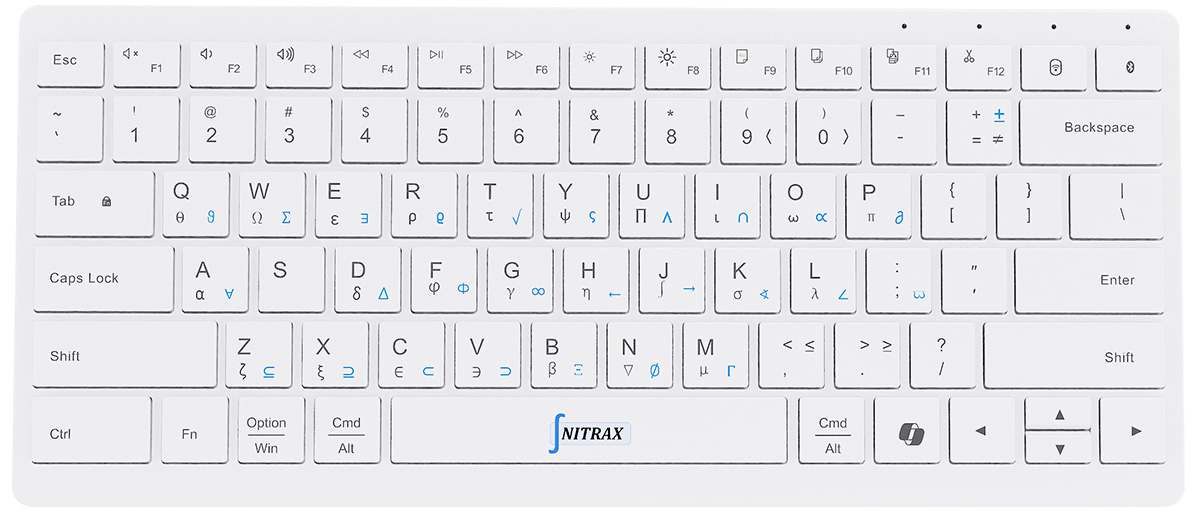
Nitrax is a physical keyboard with built-in math access. It keeps everyday typing intact while giving engineers faster access to the symbols they repeatedly need.
It is also a practical mathematical keyboard for PC users who spend most of their time in normal Windows apps instead of inside one dedicated typesetting environment.
That makes it especially useful in the messy middle of real work: between calculations and communication, between formulas and explanations, between quick notes and polished documents.
So, what is the best keyboard for engineers who write math?
If you are writing full technical papers, a markup workflow may still be the better answer.
But if you are an engineer who writes math in everyday documents, notes, explanations, and messages, a physical math keyboard like Nitrax can be the more practical choice.
For many Windows users, that also means choosing a math keyboard for PC that feels natural in normal software.
The best tool is often the one that removes the most friction from the work you actually do most often.